Build your first equations
Tessera is a visual manipulator for tensor algebra: expressions are built by fitting blocks together, the way a mosaic is laid. This page walks through four equations, from two blocks clicked into place to one the program simplifies for you, and ends with four more worth building. The first three take about five minutes.
The metaphor is mathematical, not geometric: what you see is the formal structure of a tensor expression — not a manifold, a curve or a field. The geometry of a block is the signature of the tensor, and checking algebraic validity is collision detection: if an expression is not well formed, the blocks do not fit.
The model is T-mosaic, from Giancarlo Bernacchi's Tensors Made Easy. Section marks (§) here and in the program point into that book; they are never translated, because they say where to read, not what to read. Open Tessera in another tab and follow along.
FIRST The block
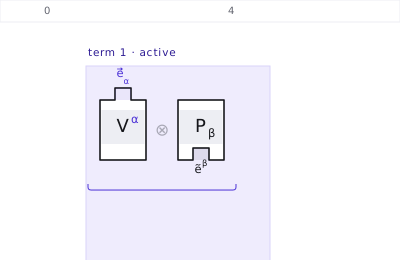
Every tensor is one block, and the block is the whole recipe of it:
- the body carries the components — the symbol and its indexes, Vα, gμν;
- an upper index (contravariant) is a pin standing on top of the block, drawn in violet, and the pin is labelled e⃗α;
- a lower index (covariant) is a hole in the bottom edge, labelled ẽα;
- a block with no connector at all is a scalar — a smooth brick, a number.
Those labels are the point, not decoration. The connectors are the basis: the pin of a vector is the basis vector e⃗α and the hole of a covector is the basis covector ẽα. Body and connectors together are the expansion on that basis — V⃗ = Vα e⃗α — with the components as the ingredients and the basis as what they are ingredients of (§1.4, §1.7).
Which is why the label's variance is the opposite of the connector's: the component Vα goes with e⃗α, and Pα with ẽα. It is not a sign slip; it is the pairing.
A connection is always a pin into a hole: one index up with one index down — a basis vector meeting its dual. That is a contraction, and a contraction is a sum over the repeated index, not a cancellation of symbols. When two blocks fit, the connectors disappear and the bodies merge, multiplying each other (§1.7): the basis is spent in the pairing, and what is left is components. Two pins, or two holes, simply do not go together, and Tessera refuses the fit rather than drawing something false.
Widths are quantised: a block is exactly as many columns wide as it has indexes. The ruler along the top counts those columns, which is why two blocks fitted under a third never overlap.
EQUATION 1 Lowering an index
The metric lowers an index: Vα = gαμ Vμ. Two clicks and one drag.
-
In the palette on the left, under fundamental, click g. Then, under generic, click V. Both blocks land in the active term — the one inside the violet band.
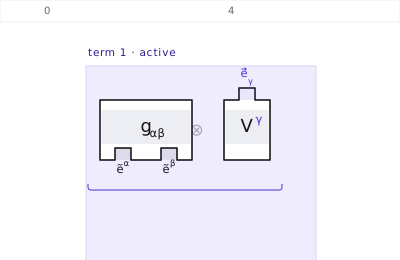
gαβ has two holes, ẽα and ẽβ — both its indexes are down — and Vγ has one pin, e⃗γ. Tessera picks the name γ on its own: an index that repeated by accident, without being connected, would not be a valid term. -
Drag V until its pin meets the right-hand hole of g. As you drag, the target columns light up — green if the core accepts the fit, red if it refuses — and when they are close enough the block snaps into place. When a fit is refused, the panel on the right says why, with the reference to the book.
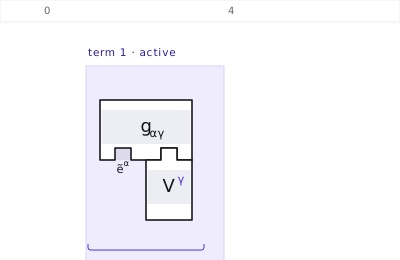
The pin is in, and the two labels are gone with it — ẽγ met e⃗γ and the pair was spent. What is left is in the bodies: γ appears twice, once up and once down, so it is a dummy index standing for a sum over γ = 1…n. Only ẽα is still free, so the assembly is a covector — the index has been lowered.
The panel on the right reads the assembly back to you the whole time: valence, rank, which indexes are free and which are dummy, and what can be done next.
EQUATION 2 Writing it instead of building it
Under by text, type the expression and press Build:
V_{\alpha} = g_{\alpha\mu} V^{\mu}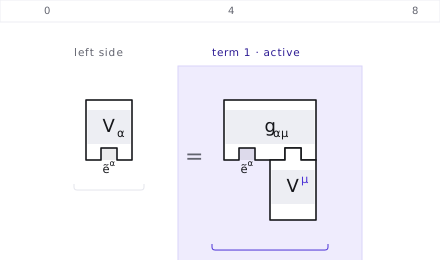
Two things are worth noticing.
-
Connections need not be stated. An index that appears once up and once
down is dummy, and dummy means contracted — so
g_{\alpha\mu} V^{\mu}is born already fitted together, with no dragging at all. - The name of a dummy index is arbitrary. It was γ when you built it by hand and μ when you typed it: same expression, different spelling.
Create block adds a single block to the active term;
Build reads the whole expression and replaces the line. Both
accept LaTeX or the glyph directly — g_{\mu\nu} and g_{μν} give the
same block.
Something larger, with two terms and a coefficient — Einstein's tensor:
G_{\alpha\beta} = R_{\alpha\beta} - \tfrac{1}{2} g_{\alpha\beta} R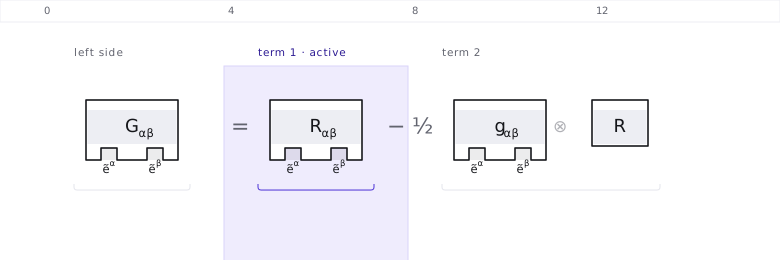
EQUATION 3 Letting Tessera do the algebra
Build the metric against its own inverse:
g_{\alpha\mu} g^{\mu\beta}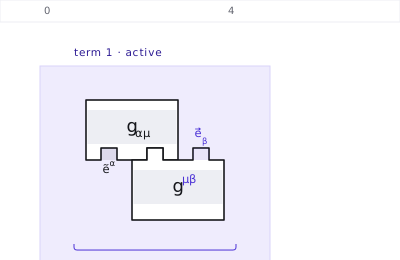
Now press Simplify in the panel on the right.
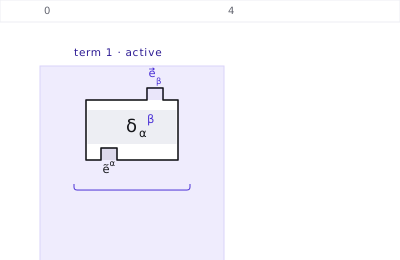
And the panel says why it was allowed to do that:
g⁻¹ and g are inverse: the inner product gives back the identity I, whose components are δ. Note that I is a THIRD tensor, neither g⁻¹ nor g. §2.13, eq.2.28
Every step of a simplification comes with its justification and its place in the book. The program does not ask to be believed.
EQUATION 4 The scalar product, and what a sum means
The book writes a covector as components on a basis, P̃ = Pα ẽα, a vector as V⃗ = Vα e⃗α, and their scalar product as Pα Vα. On the canvas both halves of that sentence are already drawn: the components in the bodies, the basis on the connectors. So the product is one gesture — the pin of V into the hole of P, which is ẽα meeting e⃗α.
P_{\alpha} V^{\alpha}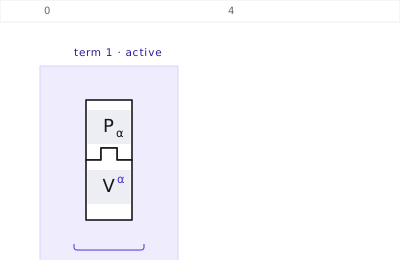
And this is what the panel says the moment the two indexes meet:
index α now appears twice: that triggers a SUM over α = 1…n, not a cancellation of symbols.
That sentence is the book's second picture — the interlocking cubes, P1V1 + P2V2 + … + PnVn. Tessera draws the structure and never the components: the dimension n box at the top of the screen is the n of that 1…n, and the sum over components is what a connection means, not something the mosaic spells out. A sum has no block of its own (§2.3) — and a sum over components has no drawing at all.
Why does the product come out as that plain sum, with the basis nowhere in it? Because the two bases are dual: ⟨ẽβ, e⃗α⟩ = δβα — one when the indexes match, zero otherwise. That is what the connectors were doing when they vanished, and you can watch it on its own: the palette has the basis blocks by themselves. Under bases, click ẽ and e⃗, then fit the pin into the hole.
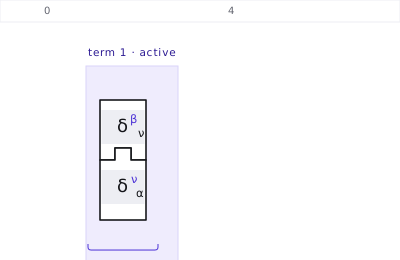
Press Simplify.
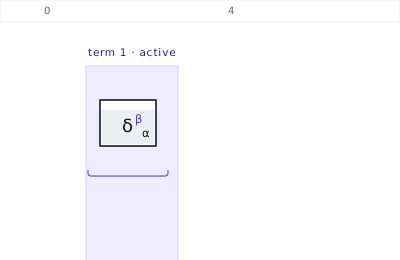
⟨ẽβ, e⃗α⟩ is the duality condition: the result is the smooth block δβα, a number. §1.7, eq.1.8
One basis block against a tensor: a single component
Pair a basis block with a covector instead of with its dual, and you get P̃(e⃗α) = Pα — the α-th component. Drop P, drop e⃗, fit the pin into the hole.
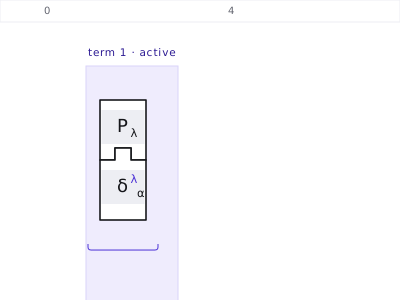
Press Simplify.
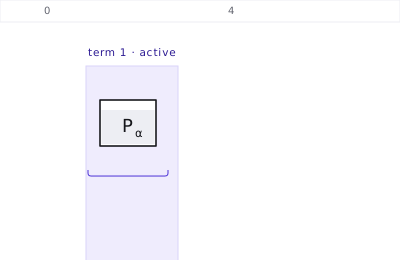
P applied to e⃗α gives back ONE component: Pα, a number. Both connectors were spent in the fit and none is left — the index that remains is the name of a compartment, in the body, not a connector. §1.7, eq.1.4, eq.1.10
The same thing from the other side gives the components of a vector: V⃗(ẽα) = Vα (eq.1.10). Rank 2 and up is left alone: there the result is a slice with one index held fixed, which the book does not introduce here, and Tessera does not claim what the book has not said.
MORE Four more worth building
Same three moves — drop, fit, press a button. These are only bigger.
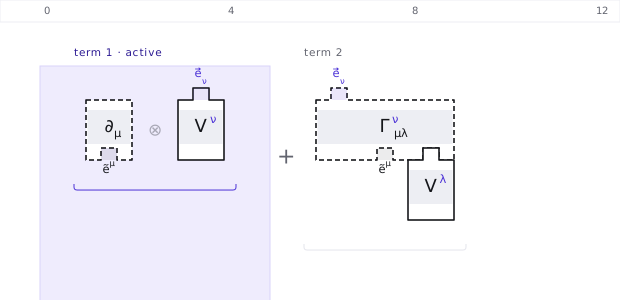
The covariant derivative, with Γ in plain sight
Build \nabla_{\mu} V^{\nu} and press Expand ∇.
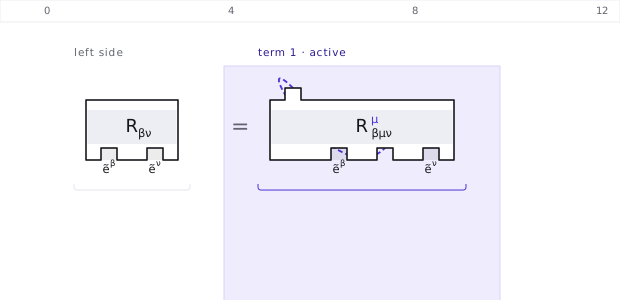
Ricci, as a contraction of Riemann
Open ready-made assemblies in the palette and pick the Ricci tensor.
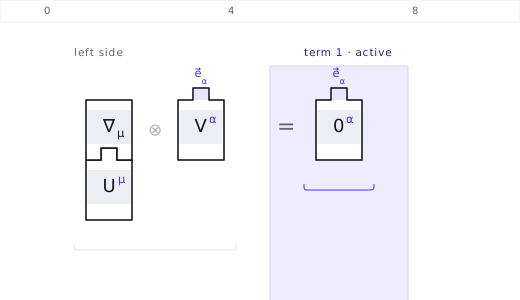
A condition: parallel transport
Changing basis: one Λ per index
Click a block and choose change basis.
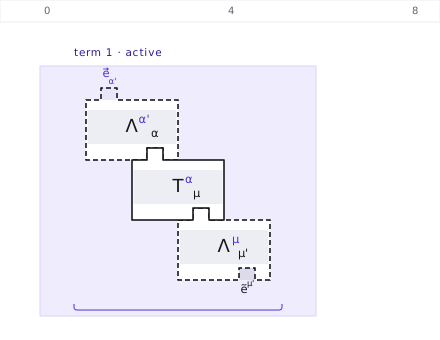
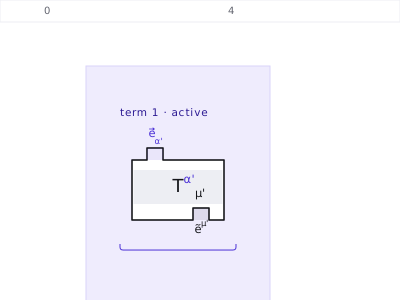
Then press Simplify, and the shoes are absorbed:
NEXT Where to go from here
- ready-made assemblies — a list in the palette with twelve equations from the book, built block by block: from g g⁻¹ = δ to the field equation, by way of Bianchi, Ricci, parallel transport and the geodesic.
- Click a block and the right panel offers what can be done to it alone: its own internal contractions, a change of basis, the split into symmetric and skew-symmetric parts, its inverse. Shift+click a second one and it enumerates every distinct way the two fit together — the results differ, so the choice is yours to make (§2.7).
- Delete removes the selected block, Ctrl+Z undoes the whole assembly, and Clear canvas starts over. A drag counts as one step.
-
Save writes the assembly to a
.jsonthat comes back here, LaTeX copies the equation to paste into a text, and SVG downloads the drawing. Your session is kept in the browser and survives a reload. - Languages — the picker at the top switches between Portuguese, English, Italian and French. The English follows Bernacchi's own vocabulary, so the words on screen are the words in the book.
Every figure on this page was drawn by Tessera itself, by the same code that draws the canvas in your browser — they are the assemblies, not screenshots of them.